
Release Title: Chargent version 8.15
Release Installation URL: Chargent Installation & Updates
Release Date: December 15, 2025
This version is no longer available to download via the Package Installation Manager (PIM). Customers may only install or update to the latest version of Chargent, which includes features, enhancements, and fixes from all previous versions. For more information about updating Chargent, see Chargent Installation & Updates.
For information about our latest release, please refer to Release Notes.
Release Overview #
Chargent v8.15 adds support for the Take Payment component in Lightning Web Runtime (LWR) Experience Cloud sites, updates our NMI payment gateway integration based on an upcoming credential requirement, and includes improvements to email validation. See the details below for more information.
If you have any questions, please contact our support team. We are always happy to help!
Not sure what version of Chargent you’re on? Click here to find out.
Release Details #
Take Payment in Lightning Web Runtime (LWR) Experience Cloud Sites
In Chargent v8.15, your customers can now make self-service payments directly from Lightning Web Runtime (LWR) Experience Cloud sites using the Take Payment Component. With the Take Payment component, your customers can track upcoming payments, make payments, and save card or bank account information for future payments. Previously, the Take Payment component was only available for Aura Experience Cloud sites.
To learn more about LWR sites, visit Salesforce’s documentation: LWR Sites for Experience Cloud.
NMI Authentication Update
The NMI Payment gateway will be changing its API integration credential requirement to use an API Key in place of a password. We recommend that customers using the NMI gateway integration install Chargent v8.15 and update their credentials at their earliest convenience.
According to NMI’s documentation, Migrating from Username/Password to Security Key Authentication, this requirement will go into effect by the end of 2026. This deadline is subject to change at NMI’s discretion.
Customers with an existing NMI gateway record in Salesforce can follow these steps to update their credentials:
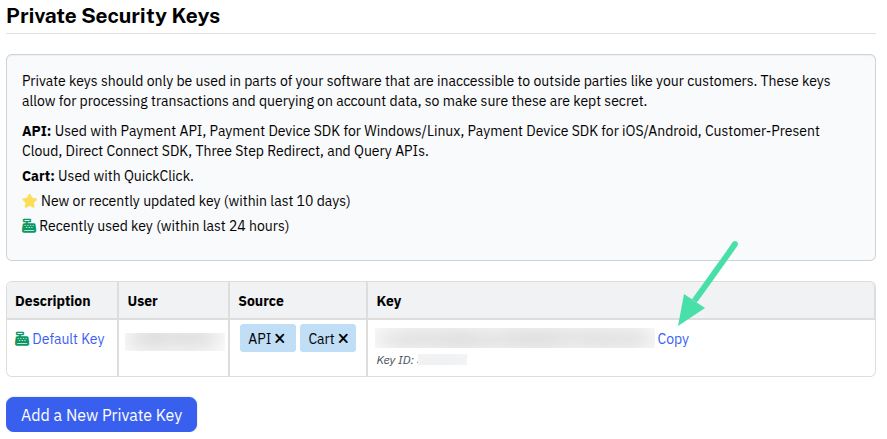
First, obtain a Private Security Key:
- Log in to your NMI Merchant Account.
- Click My Settings in the top right.
- Click Security Keys.
- Copy an existing private key or Add a New Private Key.
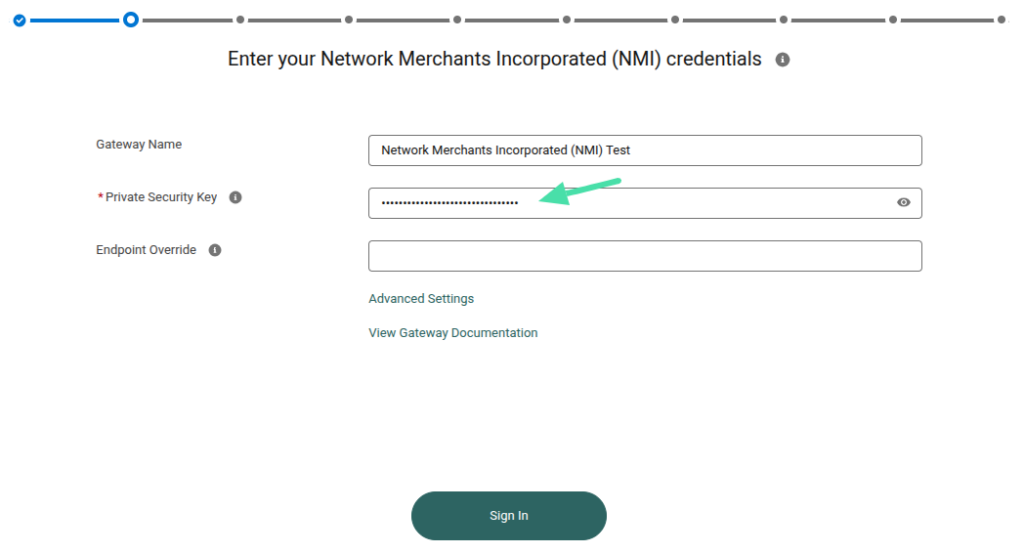
Next, update your existing gateway record in Salesforce:
- Log in to Salesforce.
- Click the AppLauncher.
- Search for and select Gateways.
- Click the down arrow to the right of your NMI gateway record.
- Click Edit.
- Add your private key to the Private Security Key textbox.
- Click Sign In to verify your credentials.
- Click Continue to save your credentials.
If you haven’t yet created an NMI gateway record in Salesforce, see the NMI Gateway Guide to get started.