
Release Title: Chargent version 8.35
Release Installation URL: Chargent Installation & Updates
Release Date: May 13, 2026
This version is no longer available to download via the Package Installation Manager (PIM). Customers may only install or update to the latest version of Chargent, which includes features, enhancements, and fixes from all previous versions. For more information about updating Chargent, see Chargent Installation & Updates.
For information about our latest release, please refer to Release Notes.
Release Overview #
Chargent v8.35 releases our new and improved Stripe Gateway integration, now using Stripe’s modern Payment API. This release also includes numerous security and compliance updates to ensure Chargent remains aligned with Salesforce’s evolving security requirements. See the details below for more information.
If you have any questions, please contact our support team. We are always happy to help!
Not sure what version of Chargent you’re on? Click here to find out.
Release Details #
Stripe Gateway Integration Updated to use Payment API
Our Stripe Gateway Integration has been reworked using Stripe’s modern Payment API. This means a more modern, more secure integration for Chargent customers, along with a faster and more stable way to keep transaction statuses up to date. One of the many driving factors that led us to improve our Stripe integration was Stripe’s removal of support for ACH Direct Debit using legacy integrations, but there are many additional benefits to using Stripe’s newest Payment API:
- Payment Method Flexibility: Take both credit card and ACH payments via Stripe in Salesforce.
- More Reliable Status Updates: Webhooks help transaction updates flow back faster and more consistently.
- Continued Long-Term Support: This update keeps Chargent aligned as Stripe phases out older APIs.
- Future-Ready Foundation: The groundwork is in place for new and exciting payment experiences.
Current Stripe Customers
Current Stripe customers can update their Stripe integration by completing these four steps in order:
- Ensure Payment Methods is enabled in your org. Payment Methods is required for the updated Stripe gateway integration.
- Install the latest version of Chargent using the Package Installation Manager (PIM).
- Activate the remote site named StripeConnect (Remote Site URL: https://connect.stripe.com). See How do I activate a Remote Site?
- Reauthenticate your Stripe gateway record in Salesforce by following the steps in How to update your Stripe gateway to use the Payment API.
Important: Please note that once you update Chargent to v8.35 or later, you may be unable to accept payments through Stripe until you have enabled Payment Methods and have reauthenticated your Stripe gateway record in Salesforce.
We recommend reauthenticating immediately after updating Chargent to minimize potential downtime.
Considering Stripe Payments in Salesforce?
If you’re considering Chargent as a payment solution or are already a Chargent customer who isn’t currently using Stripe, this is a great time to make the switch. We’re happy to discuss your payment gateway requirements to help you determine whether Stripe is right for you. Contact us to learn more!
Chargent Settings OAuth Removal
As per Salesforce’s Mandatory Security Updates for Connected Apps and ECAs, we’ve made changes to how Chargent handles automatic updates. To improve the overall security of Chargent and meet these requirements, we’ve removed the OAuth authorization process when accessing the Chargent Settings tab in Salesforce.
What does this mean for me?
This change has no impact on the functionality of Chargent, and current customers should see no impact. However, the following use cases require a few simple activation steps:
- Customers who are creating or updating the Company Logo for a Payment Request template.
- Customers who are setting up a new gateway in Chargent or activating ACH Validation.
Payment Request Static Image Setting
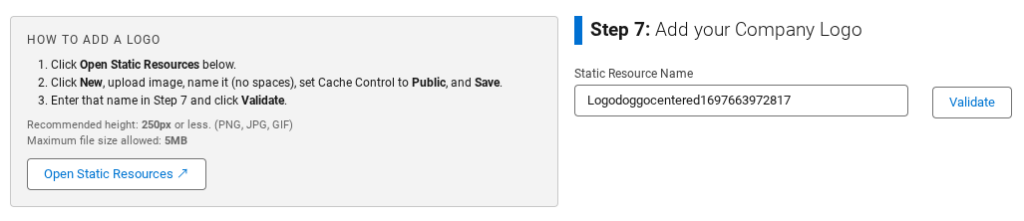
When creating or updating a Payment Request template’s Company Logo in Salesforce (Step 7), a static resource must be added beforehand. You can follow the in-app instructions to manually upload a static resource to your Salesforce org.
Remote Site Activation
Remote Sites are used to call out from Salesforce to an external site, such as your gateway or Lyons endpoints. When creating a new gateway record in Salesforce or activating ACH Validation (using Lyons endpoints), you must manually activate the Remote Site. If you attempt to create a gateway record or add your Lyons credentials without activating the Remote Site, you will receive a message with detailed instructions guiding you through the process. We’ve also included instructions in How do I activate a Remote Site?, but please be aware that some gateways handle callouts slightly differently.
See the in-app instructions for details specific to your gateway, accessible by clicking Sign In in the Gateway Setup Wizard. If you don’t receive an error message, your Remote Site is already active. Braintree customers who use ACH will not see an error message and should view the Known Issue below.
Security & Permission Updates
We’ve updated Chargent’s permissions to align with our more recent application changes. For example, older Chargent profiles have been replaced by our newer Permission Set Groups. All customers should ensure they are using Chargent’s Permission Set Groups moving forward. You can learn more by visiting Assigning Chargent Permissions.
Chargent v8.35 also includes multiple security updates to ensure that your payments are processed as securely as possible. We stand by our commitment to build trust through security, compliance, and transparency – protecting customer data while enabling innovation on every platform we support.
Visit the Chargent Trust Center to request more information about Chargent’s security and compliance.
Known Issues #
Pay button unresponsive when using a credit card in Payment Request with Cybersource SCA enabled
An issue exists in which the Pay button is unresponsive in Payment Request when Cybersource SCA is enabled. This occurs because the Guest User Profile lacks access to the `ScaCyberSource` Visualforce page. You can grant access to the Visualforce page by following the steps below.
Workaround
To resolve this issue, simply follow these steps:
- In Salesforce, visit Setup.
- Search for and select Sites.
- Click the Site Label for your Payment Request site.
- Click Public Access Settings.
- Click Enabled Visualforce Page Access.
- Click Edit.
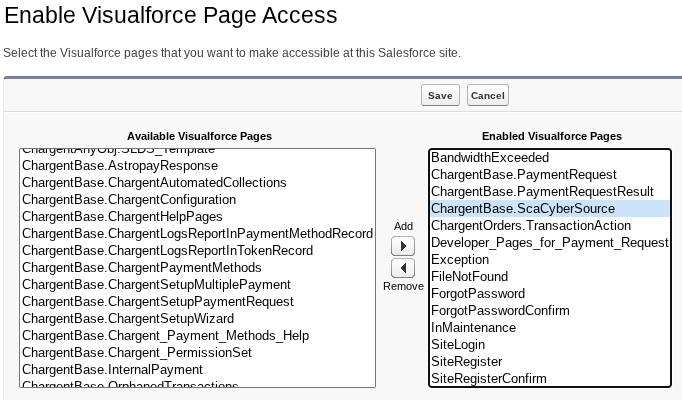
- In the ‘Available Visualforce Pages’ list, click ChargentBase__ScaCyberSource.
- Select the right-facing arrow to add the Visualforce page to the ‘Enabled Visualforce Pages’ list.
- Click Save.
You’re all set! The issue should now be resolved. Please reach out to our support team if you continue to have issues.
The Gateway Setup Wizard for Braintree does not throw an error when the Bank Account Remote Site is disabled
Per the Remote Site activation requirement noted in the Chargent Settings OAuth section above, the Gateway Setup Wizard should throw an error when the necessary Remote Site is not activated. Braintree uniquely requires that two Remote Sites be activated: one for credit cards and one for bank accounts. Due to a system limitation, an error is currently shown only when the credit card Remote Site is not activated, not when the bank account Remote Site is not activated.
Workaround
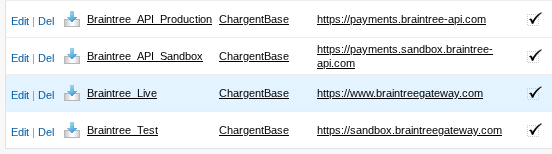
Braintree customers must ensure that all four of the following Remote Sites are activated to accept both credit card and bank account payments:
- Braintree_Live (Production Credit Card)
- Braintree_Test (Sandbox Credit Card)
- Braintree_API_Production (Production ACH)
- Braintree_API_Sandbox (Sandbox ACH)
See How do I activate a Remote Site? for instructions on activating your Remote Sites.