
Lightning B2B Salesforce Commerce Cloud Tutorial
Salesforce Lightning B2B Commerce Cloud is a powerful e-commerce platform with fully customizable storefronts for high-volume business sales. Integrating payment gateways into a B2B commerce site can be complex; developers must handle Salesforce’s Payments APIs and each gateway’s tokenization tools. Chargent streamlines this by bringing secure, pre-built payment processing directly into Salesforce. The result is unified order and payment management in one system.
Salesforce B2B Commerce Cloud Overview
Salesforce B2B Commerce Cloud, built on the Lightning platform, is designed for complex B2B buying scenarios. It ties directly to your Salesforce CRM, so sales reps see real-time commerce activity on account records. Admins customize stores using the Commerce Setup Assistant and Flow Builder — for example, creating dynamic checkout or approval flows with Salesforce Flow Builder. Behind the scenes, the storefront is built with Lightning Web Components (LWC) and the Lightning Web Runtime (LWR) framework, giving a modern, high-performance shopping experience.
The Challenge of Payments Integration
Connecting a B2B Commerce site to external payment gateways typically requires custom integration code, as each gateway (e.g., CyberSource, Stripe, Adyen) has its own API and developer documentation. Teams often must write Apex, JavaScript, or Flow logic to send authorization and capture requests. This work can delay your project. Without a ready solution, even simple transactions can take weeks of testing and debugging gateway API calls.
How Chargent Simplifies Commerce Cloud Payments
Chargent’s Commerce Cloud Connector provides plug-and-play payments inside Salesforce. You connect your chosen payment gateway in minutes with just a few clicks — no coding required. In fact, Chargent for Salesforce Commerce Cloud includes pre-built integrations with five supported processors: Adyen, Braintree, Cybersource, Stripe, and PayTrace. Just choose your preferred gateway and skip the manual API work. Once Chargent is active, buyers enter payment information directly on your Salesforce-hosted store. Chargent then works behind the scenes to securely send transactions to your gateway for tokenization — all within Salesforce.
Key Benefits of Chargent
When you integrate Chargent with Salesforce B2B Commerce Cloud, you unlock a range of powerful features that reduce manual effort, speed up payments, and give you complete control over transactions. Below are some key benefits Chargent brings to your B2B commerce environment:
-
- Gateway Flexibility: Chargent supports many popular payment networks and lets you switch providers easily. Integrate with Adyen, Braintree, Cybersource, Stripe, or PayTrace without writing new code. Chargent’s ready-to-transact connectors mean you don’t have to handle each provider’s API — Chargent does that for you.
- Commerce-Ready Features: Designed for B2B and B2B2C Commerce Cloud, Chargent helps teams go live faster, streamline the checkout experience, and improve operational efficiency. Key benefits include improved time to market, frictionless payment flows, and seamless, prebuilt integrations for faster deployment.
- Built-In Platform Capabilities: Chargent delivers everything you need to support Salesforce-native commerce payments: fast, code-free setup, support for new gateways on demand, real-time order and payment sync, and reduced checkout abandonment. It’s fully compatible with Order Management, Lightning B2B Commerce, and supports complex commerce environments across B2B2C use cases — all without data silos.
- Core Features: Chargent handles invoicing and billing directly in Salesforce. You can send customers payment requests or payment links via Salesforce emails. Chargent also automates recurring billing and subscriptions, ensuring timely and consistent customer charges. For call centers, Chargent offers a payment console that helps reduce PCI compliance scope, allowing agents to securely process phone orders.
- Transaction Support: Every common transaction type is covered. Chargent creates card tokens, manages authorizations and captures, and lets you void or refund transactions as needed. All payment activity (such as authorizations, captures, voids, and refunds) updates instantly on the related Salesforce order or invoice record.
Getting Started With Chargent and B2B Commerce Cloud
Implementing Chargent in your Salesforce Commerce Cloud environment is a streamlined process, and you don’t need extensive development resources to get started. While below is just a high-level overview, it covers the key steps to begin connecting a payment gateway, enabling secure transactions, and accepting payments. For full setup instructions, visit our Chargent for Commerce Cloud documentation.
- Have a B2B store set up: Make sure your Lightning B2B Commerce site (Experience Cloud) is live with products, pricing, and account relationships.
- Install Chargent: From the Salesforce AppExchange, install the Chargent for Commerce Cloud package. Assign Chargent licenses and permissions to your admin users.
- Configure your payment gateway: In Salesforce, go to the Chargent Settings or setup wizard. Create a new gateway connection by entering your merchant account credentials (API key, secret, merchant ID, etc.) and choosing live or sandbox mode.
- Test a transaction: Place a test order on your B2B site and enter a credit card at checkout. Verify that Salesforce creates an Authorization transaction via Chargent and that the order is approved. Finally, capture that authorization to complete the sale.
Following these steps, your Commerce checkout will seamlessly pass payment info to Chargent, and Chargent will forward transactions to the gateway without further coding.
Example Payment Flow
Here’s a typical payment flow using Lightning B2B Commerce Cloud and Chargent:
- Admin configures gateway: A Salesforce admin creates a Chargent gateway connection (for example, CyberSource) by entering the merchant ID and API keys. The gateway is now linked to Salesforce via Chargent.
- Buyer checks out: A B2B buyer logs into the Lightning Commerce storefront, adds items to the cart, and enters credit card details at checkout.
- Authorization in Salesforce: When the buyer submits payment, the Commerce checkout flow (an LWR flow or component) calls Chargent. Chargent sends an authorization (or Register Token) request to the gateway. If approved, Salesforce records an Authorized transaction on the order.
- Order fulfillment and capture: After the order ships or is approved, a sales rep clicks Capture on the transaction record to finalize the charge. The payment posts to the cardholder. If needed later, that transaction can be refunded or voided with one click in Salesforce.
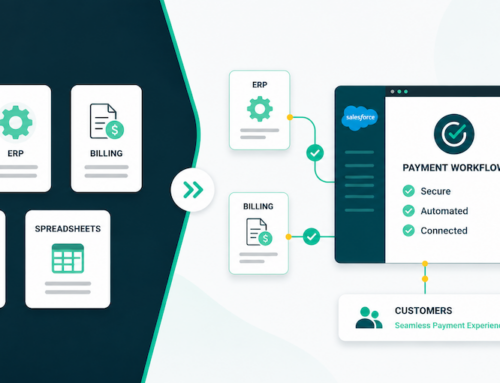
Chargent automates much of this behind the scenes. Integration can even go live in minutes. In one test, for example, connecting Commerce Cloud to CyberSource took just 15 minutes. Once live, all payment data flows through Salesforce. Your team sees authorizations, captures, and refunds in the same CRM where orders and customer data reside.
Customizing the Commerce Experience
Lightning B2B Commerce is highly customizable. You build the storefront using LWC and LWR pages. Flow Builder lets you add business logic to the checkout and post-purchase processes. Chargent fits into this model. You can trigger a Chargent payment action from a Flow or embed Chargent’s Lightning component on your checkout page. Everything stays in the Lightning framework, so the payment experience matches your store’s branding and business logic. This gives customers a seamless checkout and lets your team manage payments with familiar Salesforce tools.
Unlocking the Full Value of Salesforce B2B Commerce
Combining Salesforce Lightning B2B Commerce Cloud with Chargent creates a smooth, secure B2B purchasing experience. Buyers enjoy quick, one-click checkouts on a familiar storefront, and your team gains a unified financial view in Salesforce. Payments are processed securely (Chargent’s connectors lower the scope of PCI compliance), and orders are only completed once funds are captured. All transaction data — including authorizations, captures, and refunds — lives in Salesforce alongside your CRM data. In short, integrating Chargent with B2B Commerce means smoother checkouts and a single system for orders and payments, improving customer satisfaction and driving growth.
Ready to streamline your B2B payments and unify your commerce workflows? Contact us today to see how Chargent can help.