Simplify Secure Payments in Your Salesforce Digital Experience Page
Collecting payments should feel as easy as clicking “Like,” yet for many Salesforce teams, it still involves emailed invoices, phone calls, or a third-party cart that never quite syncs with the CRM. In this post, we’ll show step by step how to fold Chargent’s native payment tools into a Salesforce Digital Experience page using Salesforce Flows. Think of it as adding a checkout lane to the same store where you already greet customers.
Whether you run a nonprofit donation drive, a university event, or a B2B invoice portal, this approach can help deliver a faster, safer digital customer experience for authenticated members and anonymous guests.
Key Chargent Takeaways
- Self-service checkout in hours: Accept credit card, ACH, and ACH wire payment directly inside Salesforce—no external gateway UI.
- One portal, all users: Authenticated members and anonymous donors pay through the same Salesforce digital experience page.
- Tokenization first: Sensitive data never lives in Salesforce; Chargent Orders store secure tokens only, helping you meet PCI DSS goals outlined in our fraud-prevention blog.
- Clicks, not code: Build payment flows with Salesforce Screen Flows. No coding required, no tools outside the platform.
- Immediate ROI: Less manual entry, fewer chargebacks, and real-time reporting on every transaction.
Understanding Chargent and Digital Experience Pages
Chargent and Digital Experience Pages are powerful on their own—but when combined, they unlock a whole new level of payment automation. First, let’s get grounded in what each one brings to the table.
Chargent—Payments Where Your CRM Lives
Chargent is a Salesforce-native application for payment processing. It supports credit card payments, ACH (bank transfers), recurring payments, and even tokenizes payment information for security. Because Chargent runs entirely within Salesforce as a managed AppExchange package, all payment data stays in your CRM, ensuring your records are always in sync.
Salesforce Digital Experience Pages
Salesforce Experience Cloud is the digital experience platform used to build external-facing websites, enabling organizations to create branded sites that interact directly with Salesforce data. These pages can be accessible to authenticated users (login required) as well as unauthenticated guest users, allowing you to serve both registered members and the general public.
By embedding payment functionality on an Experience Cloud page, you enable payments to be collected directly on your site and recorded instantly in Salesforce. This blend of Chargent with a Digital Experience page helps eliminate tedious CSV imports and manual reconciliations that eat up precious time and possibly introduce serious errors into your accounting.
The Power of Flow-Enabled Automation With Chargent
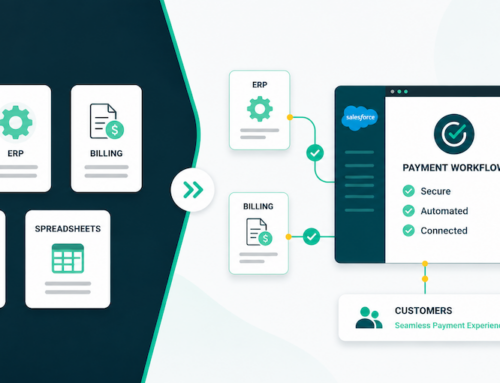
If Experience Cloud is your storefront, then Salesforce Flows are the conveyor belts that move money straight into your CRM. With a single Screen Flow and Chargent’s Take Payment component, you get:
- Instant processing: The component talks to your gateway, returns a token, and writes both Chargent Order and Transaction records in one seamless transaction—no middleware, no delays.
- Contextual updates: Flow logic can bump a donor’s lifetime total, mark invoices “Paid” and notify Finance, renew memberships, or update any custom field. And this all happens with mouse clicks, not code.
- Effortless scaling: The same Flow that processes ten donations today can handle ten thousand tomorrow with no extra staff or redeployment. Need a coupon field or multi-currency? Drag in a new component, publish, and you’re live with no downtime.
- Modern UX, minimal scope: Deliver a branded, instant-validation checkout and never store raw card data, keeping PCI footprint tiny.
From the user’s perspective, the digital customer experience feels like any modern checkout: brand-colored form, instant validation, and an on-screen thank-you. From IT’s view, it’s point-and-click automation that slashes manual keying, improves data accuracy, and never stores raw card data, keeping PCI scope minimal. (For detailed steps on building your Flow, see our Flow-Enabled Take Payment Component User Guide.)
Enabling Guest User / Unauthenticated Access
Experience Cloud sites can expose pages to the public, making it possible to offer payment functionality without requiring users to log in. Allowing unauthenticated users to submit payments is a key component of open donation forms, public event signups, or invoice portals, where requiring a login would introduce unnecessary friction and reduce completion rates. To let a guest submit a payment:
- Grant the site’s Guest User profile run access to your payment Flow.
- Assign the Chargent Guest User permission set.
- Implement a verification method to prevent bad actors from using unauthenticated donation forms to test stolen credit cards (a tactic known as carding).
- Test in sandbox with gateway test cards to ensure the guest can pay but cannot see internal data.
Now, donors or one-time buyers can pay without creating an account, while the same fraud-screening and tokenization protect every transaction. (To learn more about setting up guest access, read our guide on Flow Take Payments for Guest Users.)
Implementation Blueprint
The following six steps consistently take teams from sandbox to production in under a week. Each step ties back to the native tools you already own.
- Chargent setup: Install Chargent’s current version from AppExchange and choose a gateway that meets your PCI compliance goals.
- Digital experience site configuration: Create or reuse a site, enforce HTTPS, assign your domain, and apply branding.
- Flow design: In Flow Builder, create a Screen Flow. Drag the Take Payment Component onto the canvas, map Amount, Contact, and Gateway variables, and add post-payment logic such as updating Order Status or sending a receipt.
- Embed flow in the page: In Experience Builder, drag the Flow widget into the layout and select your new flow. Page variations can show different banners to members versus guests.
- Configure guest user permissions: Assign the Chargent Guest Permission Set, restrict record types, and turn on reCAPTCHA.
- Thorough testing: Use gateway test cards and ACH sandbox accounts. Confirm that only tokens, not full PANs, are stored. Test success, decline, and network failures to ensure user-friendly error messages.
Practical Use Cases
Once the pattern is in place, it scales across multiple revenue streams. The examples below come directly from customer projects.
- Donation forms: Nonprofits embed a recurring-gift page that writes to Opportunity records and immediately updates Campaign Influence.
- Event registrations: Universities merge registration data with the payment component, issue tickets, and update Course Enrollment records.
- Invoice payments: B2B finance teams email secure links that preload amounts due, cutting days-sales-outstanding without spreadsheets.
- Membership renewals: Associations let members self-renew, capturing new card tokens for next year’s billing.
- Simplified e-commerce checkout: Consumer brands build quick-buy pages for upsells, boosting both AOV and overall digital customer experience metrics.
Security and Compliance
A solid payment strategy requires a strong compliance plan. The checklist below helps keep auditors happy and data safe.
- Tokenization: No card or bank account numbers live in Salesforce.
- TLS 1.2+: Enforce HTTPS on every page.
- Least-privilege guest rights: Guest users can only access the objects and fields necessary to make a payment.
- Event monitoring: Log every payment attempt for forensic analysis and BI dashboards.
- Regular updates: Update to Chargent’s current version to align with evolving PCI rules.
From Blueprint to Live Portal
High abandonment, manual reconciliations, and fraud risk drain resources daily. Automating Chargent inside Experience Cloud tackles all three with clicks, not code. Spin up a sandbox, follow the blueprint, and launch a pilot page. Your finance team will notice faster closes, your customers will enjoy a smoother checkout, and you’ll earn a measurable win for your digital experience strategy, while keeping every record inside Salesforce.
Explore integrating Chargent with your Salesforce Digital Experience pages and begin a pilot project with a 30-day free trial.