
Payment Pain Point: The Swivel-Chair Routine
There is a hidden tax on revenue that rarely appears on a P&L (Profit and Loss) statement: the swivel-chair routine. It happens when employees have to jump from Salesforce to a payment terminal, then to accounting software, then to a spreadsheet or email thread just to complete one payment task. The transaction may get processed, but the workflow around it is slow, fragmented, and error-prone.
That burden is larger than many teams realize. Microsoft has reported that the average user toggles between apps nearly 1,200 times per day and loses roughly four hours per week reorienting after those switches. Asana has likewise found that knowledge workers switch between 10 apps as many as 25 times per day. In a payment workflow, that kind of app switching is not just distracting. It delays cash collection and increases the chance that records will not match across systems.
Why disconnected payment workflows create friction
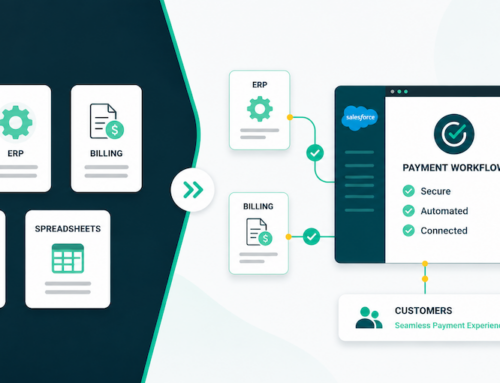
This is the operational reality inside many organizations. Sales teams may work in Salesforce, but when it is time to collect payment, they log into Authorize.net, Stripe, or another gateway cabinet. Finance then re-keys the transaction into QuickBooks or another accounting platform. Some teams still use spreadsheets to track payment schedules, failed transactions, or customer follow-up. None of these workarounds is unusual, but together they create drag at exactly the point where speed and accuracy matter most.
The first problem is delay. Every extra system adds another login, another screen, and another opportunity for work to stall. Salesforce has reported that 72% of sellers’ time is spent on non-selling tasks. If payment collection requires leaving the CRM, then revenue teams are losing time not just to administration, but to broken process design.
The second problem is inconsistency. When payment data lives in one place, customer records in another, and accounting details in a third, teams begin operating from different versions of the truth. PwC reported that 54% of CFOs say their organizations still do not have standardized accounting data across the group, and about one-third operate mainly in Excel without automation. That kind of fragmented data flow makes reconciliation harder and visibility weaker.
The third problem is manual error. Re-entering payment data across systems increases the risk of mistakes, whether that means a wrong amount, a missed update, or an incomplete customer record. Salesforce has noted that manual entry raises the risk of error, while automation improves data integrity. For payment operations, this matters because even small errors can affect invoicing, collections, and customer experience.
Collect payments where work is already happening
The stronger approach is to collect payments where work is already happening. Instead of forcing staff to leave Salesforce and use disconnected systems, organizations can enable payment collection directly inside the pages their teams already use, such as the Opportunity, Case, or Account record. This turns the system of record into the system of action.
That is the value of Chargent Anywhere. It is a no-code way to payment-enable pages in Salesforce so users can collect card or bank payments without object-hopping between systems. Sales can take payment from the Opportunity they are already working in. Support can resolve a case and collect payment in the same interaction. Finance gains clearer visibility because the payment event stays tied to the customer record instead of being recreated elsewhere.
Payment modernization is a workflow strategy
The broader lesson is that payment modernization is not only about processing transactions faster. It is about removing the workflow friction around payment collection. If your teams are still bouncing between the CRM, gateway portals, spreadsheets, and accounting tools, the issue is bigger than payments. It is workflow design. The organizations that solve this gain more than efficiency. They gain better data quality, faster time-to-cash, and a smoother customer experience.
Are you wrestling with this costly, context-switching pain point? Contact us today and we’ll help you solve this problem.
Frequently Asked Questions
What is swivel-chair payment processing?
Swivel-chair payment processing is the practice of moving between separate systems to complete a payment task, such as copying information from Salesforce into a gateway portal and then rekeying results back into Salesforce.
Why do disconnected payment workflows slow down revenue teams?
Disconnected workflows create extra clicks, duplicate data entry, delays, and more opportunities for mistakes. Teams spend time reconciling records instead of serving customers, collecting revenue, or resolving exceptions.
How can Salesforce-native payments reduce manual rekeying?
Salesforce-native payments let teams initiate, track, and reconcile payment activity from the same CRM records they already use. That reduces the need to copy payment data between Salesforce, gateways, accounting tools, and spreadsheets.
What are the benefits of keeping payment data in Salesforce?
Keeping payment activity in Salesforce gives teams better visibility into customer balances, invoices, payment status, failed transactions, and follow-up tasks. It also supports cleaner reporting and more automated revenue operations.
Sources
- Microsoft, on app switching and time lost to reorientation:
https://www.microsoft.com/en-us/dynamics-365/blog/business-leader/2024/02/12/microsoft-dynamics-365-business-central-and-microsoft-365-connect-data-to-the-tools-where-work-is-done/ - Asana, on how often knowledge workers switch between apps:
https://asana.com/resources/multitasking - Salesforce, on the share of sellers’ time spent on non-selling tasks:
https://www.salesforce.com/in/blog/15-sales-statistics/ - PwC, on lack of standardized accounting data and continued Excel-heavy processes:
https://www.pwc.com/si/en/publications/report-2026.html - Salesforce, on manual entry increasing the risk of error:
https://www.salesforce.com/blog/automated-onboarding/ - Forrester Total Economic Impact research, on automation reducing manual-data-entry-related payment errors:
https://tei.forrester.com/go/ramp/financeoperations/